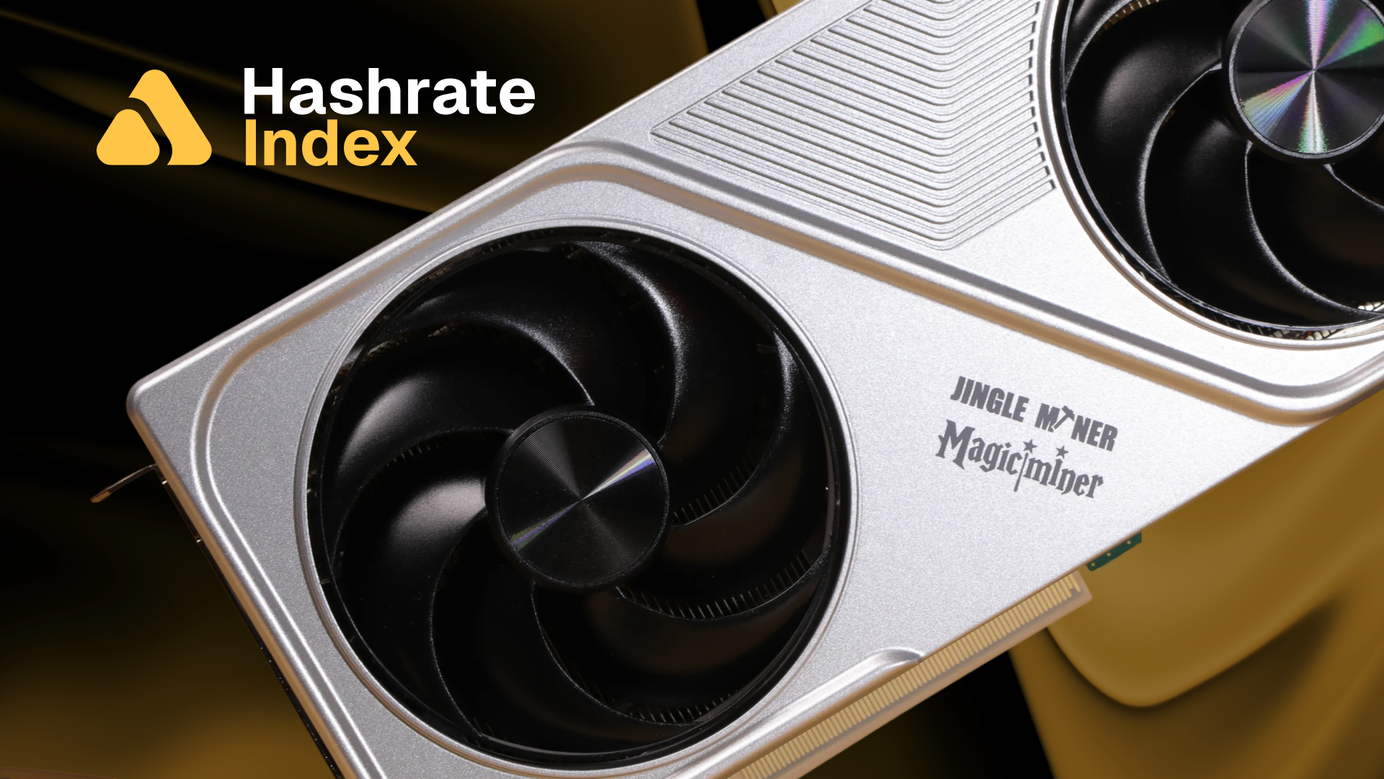
Jingle Miner BTC Hashcard: Home Miner With GPU Form-Factor and Software Support Stack
Bringing GPU aesthetics back to Bitcoin mining with ASICs under the hood.

Bitcoin mining was born at home. In 2009 the network ran on CPUs, and soon after on GPUs humming away in bedrooms and basements. As the network grew, mining professionalized: GPUs gave way to purpose-built ASICs, solo mining gave way to pooled mining, and hashrate consolidated into industrial facilities chasing the cheapest electrons on Earth. For most of the last decade, home mining looked economically extinct. Yet a small, determined niche kept it alive; motivated less by profit than by ideology, education, and principle. That niche is now resurgent, and a healthy open-source community surrounds it with projects like Bitaxe, HeatPunks, and others.
Among hardware manufacturers, the home mining segment has come a long way since the original Avalon Nano. What started as a USB-powered curiosity is now an established product category, and purpose-built home miners continue arriving to serve it. Canaan's Nano 3 brought home mining onto the desk, the Nano 3S refined it, and the Mini 3 pushed it further down the line to the baseboard.
Now there's a new entrant from a different direction. Enter the Jingle Miner BTC Hashcard.
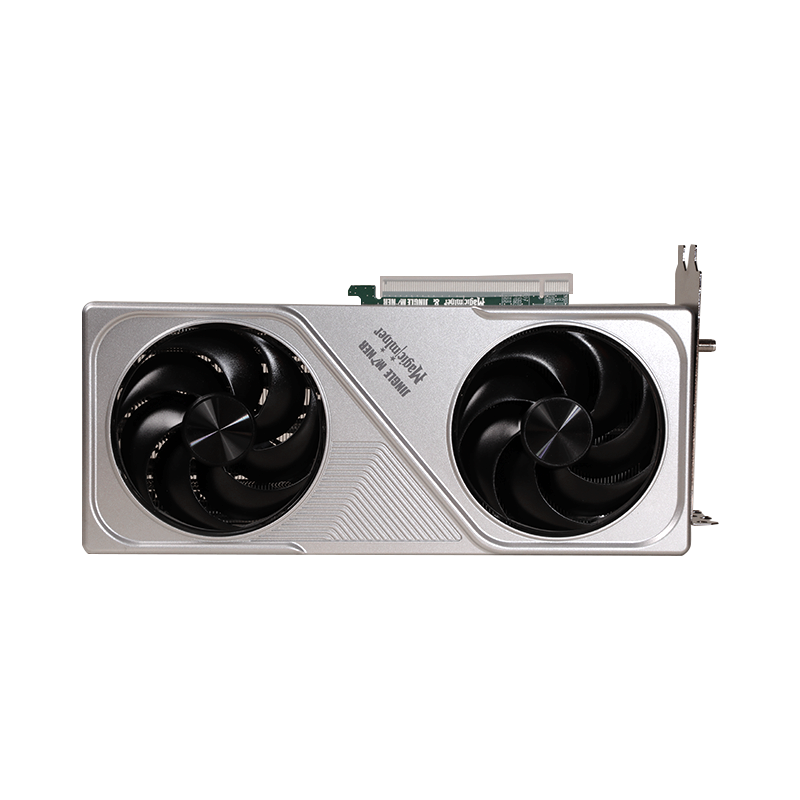
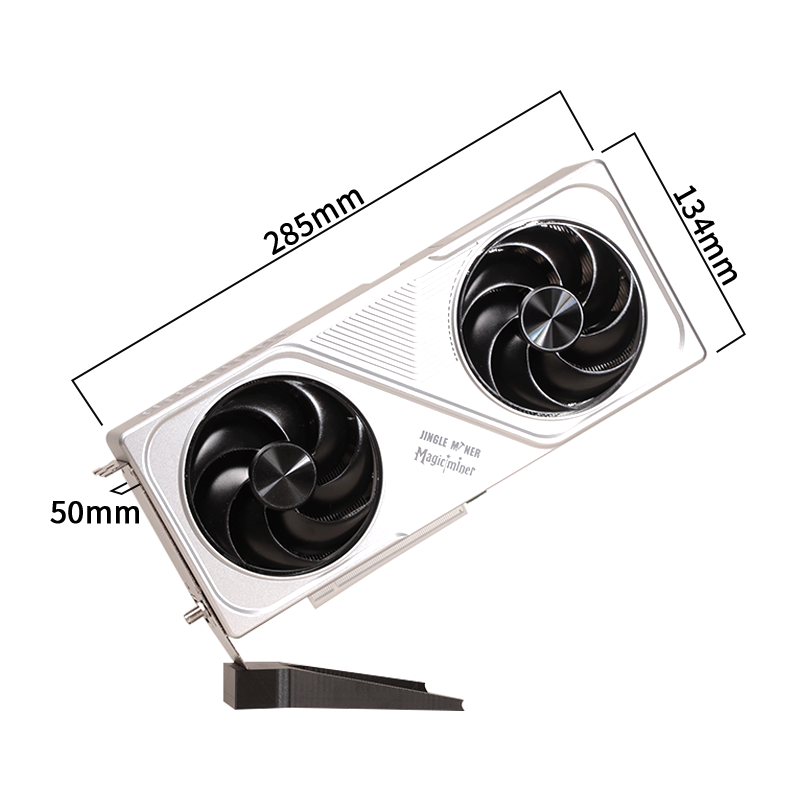
At 12.5 TH/s and ~200W of power, Jingle Miner’s BTC Hashcard mines at a nameplate efficiency of 16 J/TH. Its raw mining metrics are respectable, but its GPU form factor is what makes it stand out. Where other home miners lean into appliance design, the Hashcard is unapologetically a graphics card. It's the first home mining machine to deliberately reach back to the early-2010s GPU mining era for its aesthetic, and it does so with nine BM1370 chips (the same silicon found in Bitmain's industrial-grade Antminer S21 Pro ASIC) running under the hood. In addition, it comes with interesting software support tools that give the home miner a glimpse into what running enterprise mining operations is like. The opportunity set ranges from firmware optimization to dynamic fleet management and automated power price optimization strategies.
Let's dig in.
Performance Specifications
| Feature | BTC Hashcard |
|---|---|
| Hashrate | 12.5 TH/s ±10% (up to ~14 TH/s overclock) |
| Power Draw | ~200W |
| Efficiency | 16 J/TH |
| ASIC Chips | 9 × Bitmain BM1370 (SHA-256d) |
| Dimensions | 285 × 50 × 134 mm |
| Weight | 1.8 kg (bare) / 3.1 kg (boxed) |
| Noise Level | ≤40–50 dB |
| Connectivity | Ethernet + 2.4 GHz Wi-Fi |
| Power Adapter | 12V / 34A external brick (US/EU/UK/AU) |
| Operating Range | 0–40°C, air-cooled |
| Warranty | 180 days (manufacturer) |
| Purchase Price | ~$559.99 USD |
The Hashcard boasts nine integrated BM1370 ASIC chips which deliver a nameplate 12.5 TH/s while consuming 200W of power. A more conservative 225W wall-power figure would imply an efficiency of 18 J/TH, which is in line with the average industrial mining fleet efficiency. Hashrate Index Premium’s latest Quarterly Mining Projections report (Q2 2026) projects the Bitcoin network’s global mining efficiency at 18.1–18.5 J/TH as of June 2026. Find out more on bitcoin mining economics with a Gold Tier membership:
BM1370 ASIC
The Hashcard's defining feature is the chip choice: Bitmain’s BM1370. It is a third-generation 5nm ASIC, originally designed for the Antminer S21 Pro.
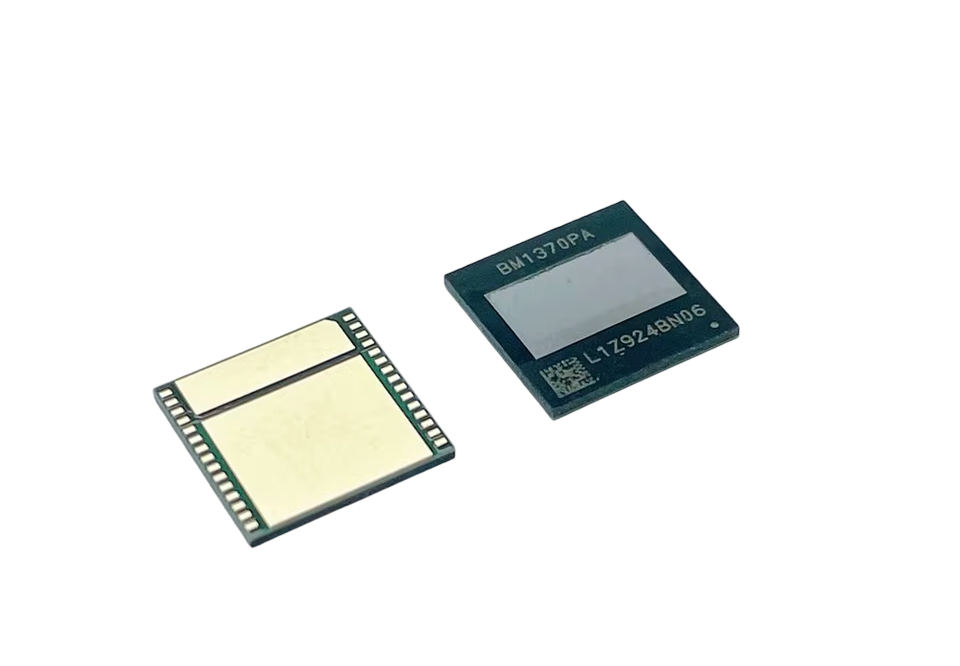
Fitting nine of them in a desktop shell produces an efficiency profile that's genuinely competitive with mid-generation industrial gear.
What’s In The Box
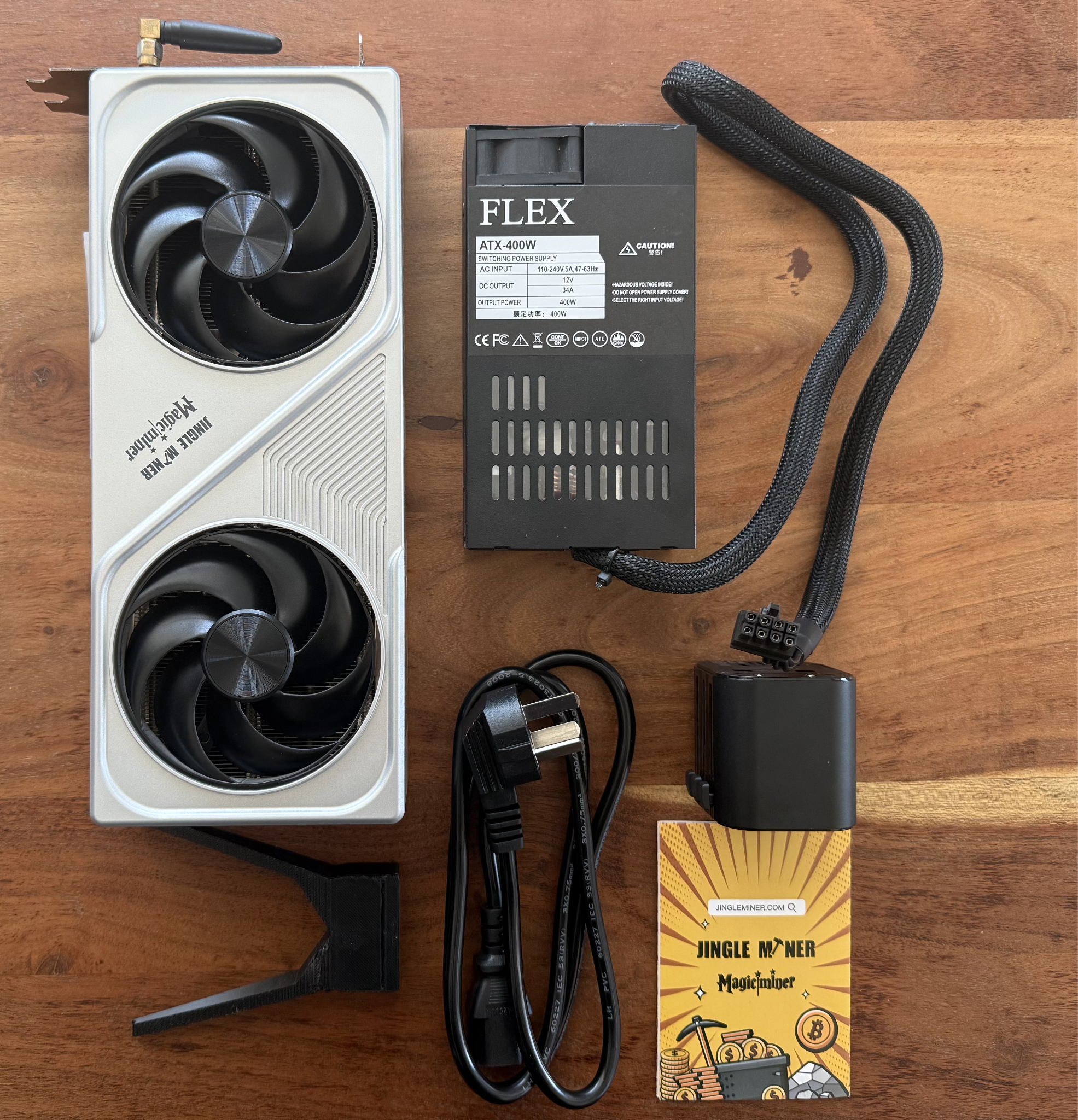
Jingle Miner ships the Hashcard with a 12V/34A external power brick and a global plug adapter (US, EU, UK, and AU), so the unit is ready to run out of the box in most markets. The package also includes a quick-start card with a QR code linking to Jingle Miner’s setup tutorial.
Setup: Plug In, Pair Up, Point to Pool
Setup carries a familiar home-miner script. Jingle Miner relies on the device's own Access Point (AP) mode web interface:
- Plug in the 12V power brick and connect either Ethernet or join the device's default Wi-Fi SSID (named JingleMiner_xxxx).
- Browse to the device's admin page and configure your home Wi-Fi or static Ethernet settings.
- Enter your mining pool URL, worker name, and password. For Luxor Pool users, that's stratum+tcp://btc.global.luxor.tech:700.
- Pick your operating frequency (more on that below) and save. The device will reboot and start hashing within a few minutes.
Mining Economics
Time for brutally honest math. It is (for the most part) irrational for a home miner to expect a profit. Industrial operations mine at power costs between $0.03–$0.05/kWh versus retail electricity rates ranging anywhere from $0.09–$0.25/kWh, with a global average around $0.175/kWh. That is many multiples of a difference. Home miners (for the most part) don’t have access to electricity rates that are cheap enough to mine competitively.
At a 12.5TH/s, 16 J/TH performance profile and current mining economics, the Hashcard breaks even at an Energy Hashprice of ~$0.07/kWh or a USD hashprice of ~$27 per PH/s/day, beyond which it is unprofitable.
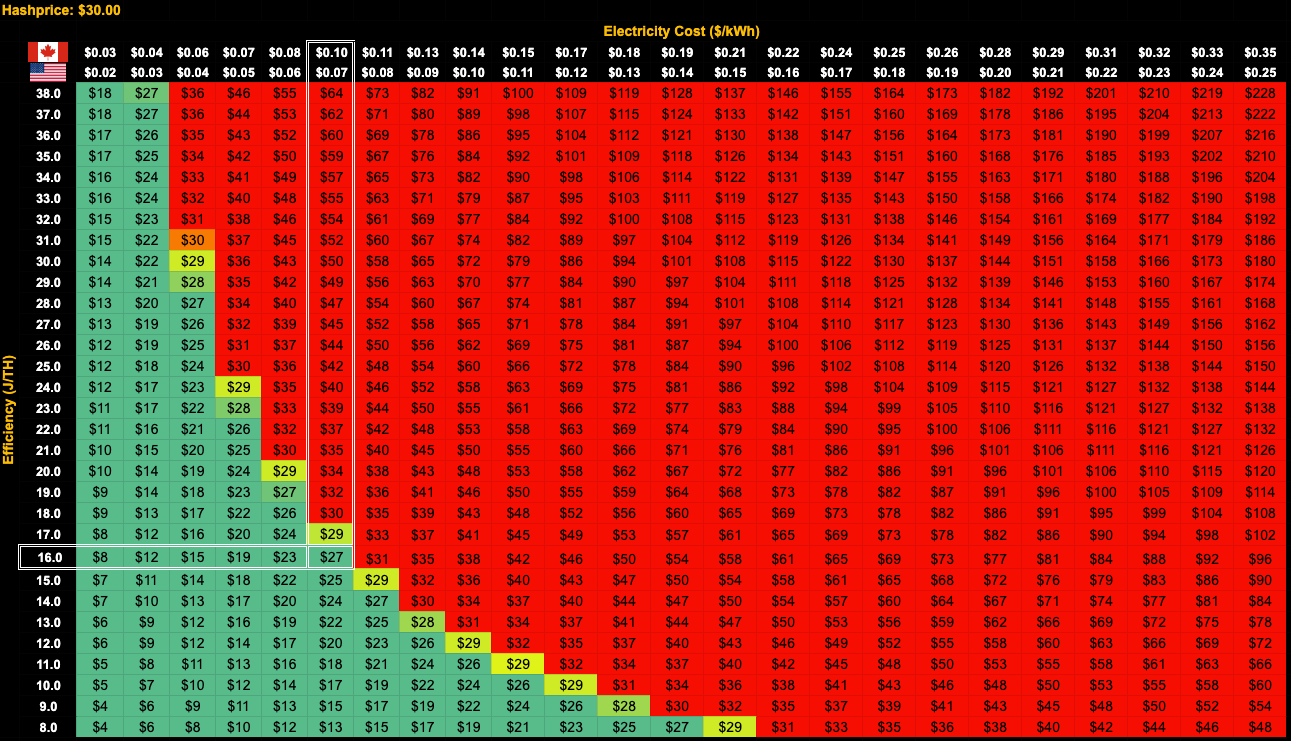
So the question is: where in the world, if any, does the average home electricity bill clear that bar? The TLDR: for the bulk of Hashrate Index’s readership, the Hashcard is a hobby device at flat residential rates. But "flat residential rates" actually means a lot of complexity behind the scenes, and that’s where the story gets more interesting. More on this later.
Power cost matters most for a miner’s margin, but the revenue side — hashprice — matters too. With spot hashprice currently hovering at near all-time lows, and six-month contracts for the forward hashrate curve trading in backwardation, miner margins are tight and expected to remain as such for the near future.
At the current network state (~1 ZH/s hashrate, difficulty 138.96T, hashprice in the ~$30 per PH/s/day range), a 12.5 TH/s machine produces roughly the following:
- Daily revenue (via pool): ~$0.375 / ~569 sats
- Monthly revenue: ~$11.25 / ~17,100 sats
- Annual revenue: ~$137 / ~207,700 sats
Against a $559.99 purchase price, you're looking at a hardware payback period of ~9.5 years, and that’s at $0.045/kWh power. The Hashcard is clearly not a profitability play. But it's not meant to be, and Jingle Miner's marketing materials are clear-eyed about that.
There are reasons beyond profit to mine bitcoin at home. Running your own miner, however small, makes you a direct participant in Bitcoin’s consensus rather than a passive holder. It is a hands-on experience in learning how the network actually works — difficulty, hashrate, pool mechanics, and block discovery become more than abstractions. There is a decentralization argument too: every independent miner marginally dilutes the network’s geographic and operational concentration. A home miner can also earn freshly minted sats paid directly by a pool with no exchange or intermediary in the loop. For many home miners, those motives (participation, education, decentralization, and self-sovereignty) are the entire point, and the power bill is simply the cost of admission.
Jingle Miner’s BTC Hashcard also leans into the lottery luck: at 12.5 TH/s you have roughly a 1-in-80 million chance of finding a block in any given 10-minute interval, and about a 0.066% probability of solo-mining a full 3.125 BTC block in any given year of continuous operation.
For context, that's roughly 2x the per-machine odds of a 6 TH/s Avalon Nano 3S and about 10x those of a 1.2 TH/s Bitaxe Gamma. It's still a long-tail bet, but it's a meaningfully fatter tail than anything else in the lottery miner segment.
Deployment Scenarios
Jingle Miner recommends a range of four deployment scenarios: desktop, standard PC case, PCIe GPU dock, and full GPU server cluster.
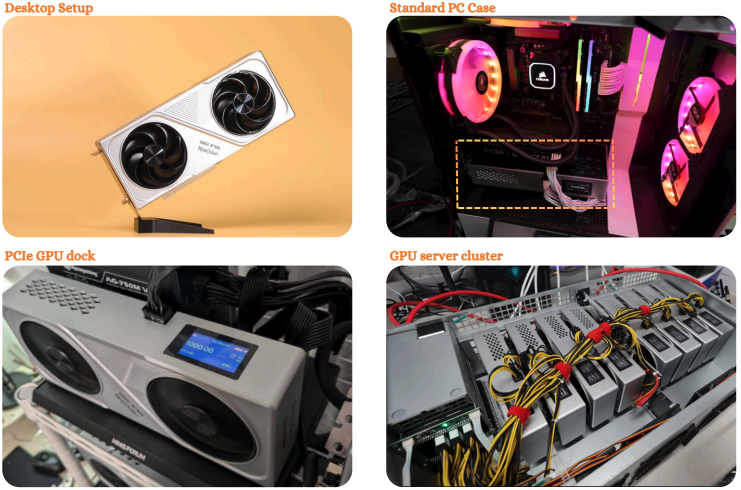
All four work because of the standardized form factor. You could conceivably build an 8x Hashcard rig in a mining frame for ~100 TH/s of SHA-256 compute power at ~1.6 kW, earning ~4,550 sats per day at a production efficiency of ~119 sats per kWh. Running all eight cards 24/7 at a global average retail electricity cost of $0.175/kWh would burn ~$6.72/day in power against ~$3.00/day in revenue.
Firmware & Frequency Profiles
Where the Nano 3S exposes three power modes (Low / Medium / High) and the Mini 3 exposes four (Night / Eco / Super / Mining), the Hashcard exposes nine discrete ASIC frequency steps (between 500 Hz and 750 Hz), with a default setting at 700 Hz which targets the nameplate 12.5 TH/s.
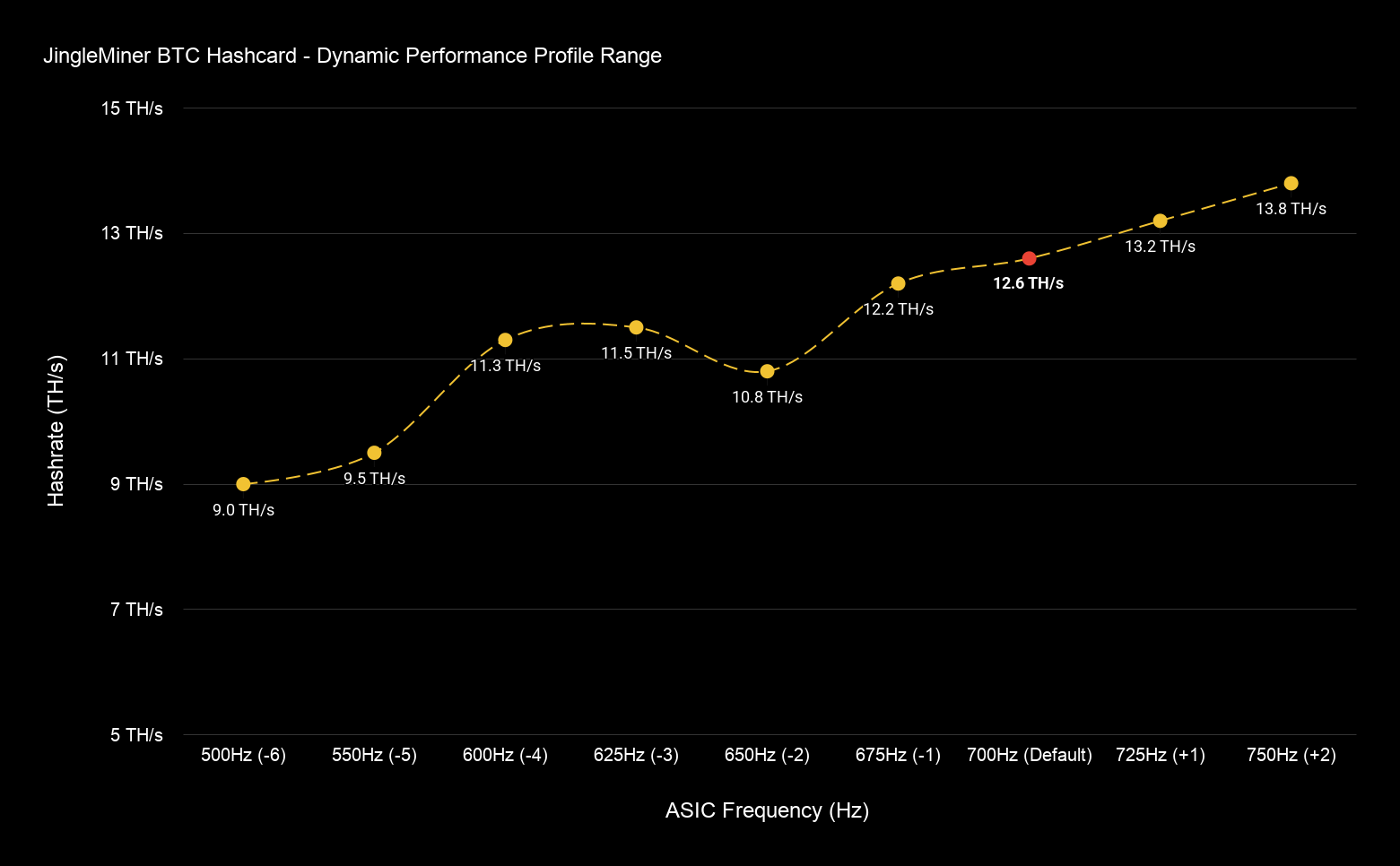
This range of performance profiles reveals something special: that peak performance often occurs at frequencies well below maximum settings, as demonstrated by the Hashcard’s efficiency curve below.
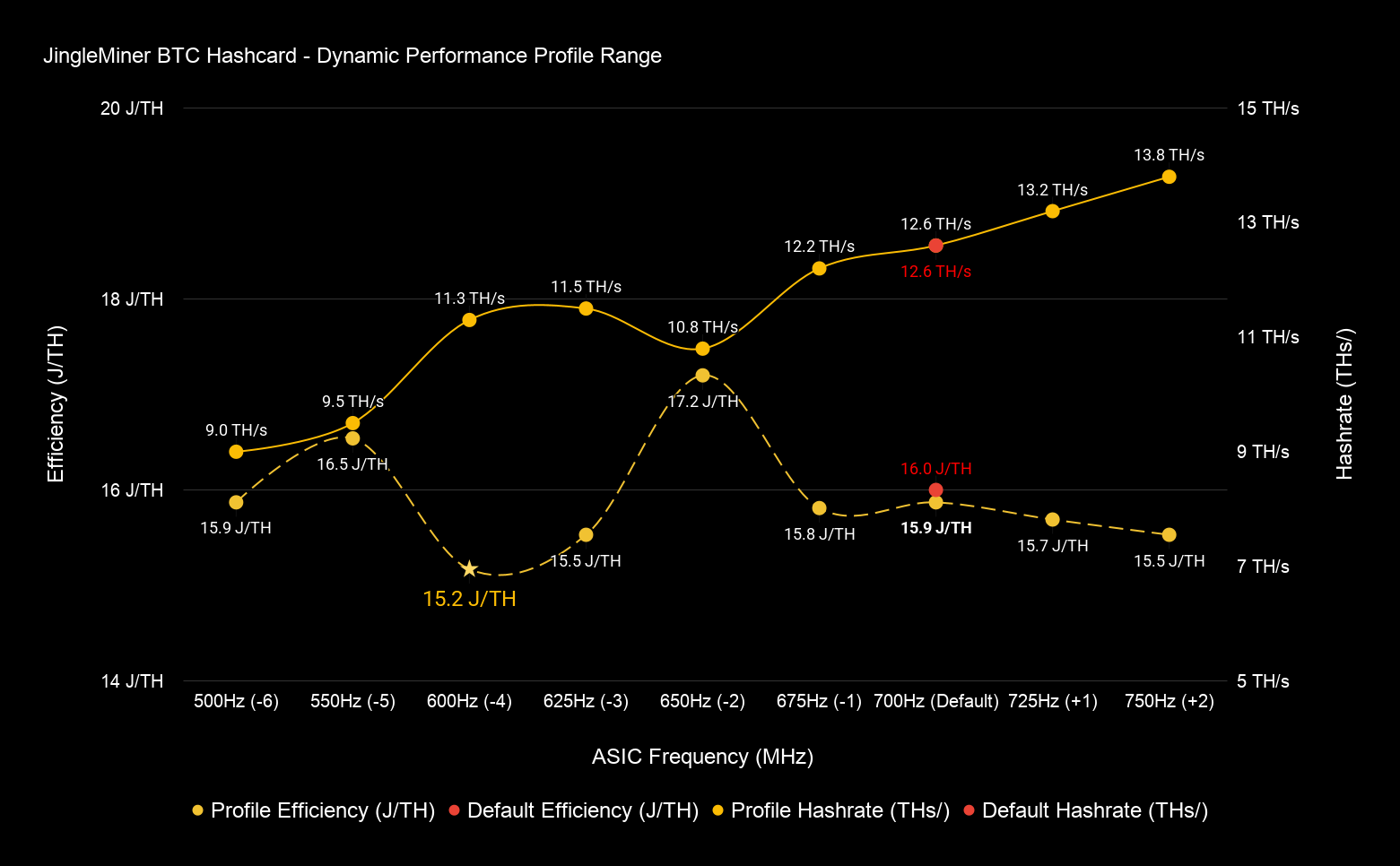
Note: efficiency curves are idiosyncratic, varying between individual machines, chip bins, and testing environments. Luxor did not independently bench these values; the figures here are derived from Jingle Miner’s published nameplate performance profile and are used to illustrate the concept of frequency tuning, not as verified test results.
At the –4 profile (600 Hz), the BTC Hashcard produces 11.3 TH/s — roughly 90% of its nameplate 12.6 TH/s — while implied efficiency improves from 16 J/TH to 15.2 J/TH, a ~5% gain. This illustrates the non-linear relationship between consuming power (W) and producing hashrate (TH/s). At higher frequencies, power draw tends to rise steeply whereas hashrate scales more linearly. As a result, efficiency “sweet spots” tend to emerge at mid-range profiles where miners can capture a majority of hashrate output (revenue) at significantly lower energy input (cost). The Hashcard’s efficiency “sweet spot” is around the –4 profile (600Hz), where it captures roughly 90% of nameplate hashrate at the lowest J/TH available.
This efficiency gain becomes economically significant at industrial scale where electricity represents 60–80% of total operating (OpEx) costs. The ability to operate in "efficiency gears" during high-price intervals preserves profitability by sacrificing some hashrate production for an outsized improvement in cost savings. Hashcard enables this dynamic profitability play at the desktop scale.
Two takeaways for home miners:
- The recommended tuning window per Jingle Mining is 500–725 Hz. Pushing overclock to 750 Hz unlocks ~10% more hashrate (13.80 TH/s vs. 12.60 TH/s) but moves into territory where efficiency can be expected to degrade non-linearly. Useful for miners looking to maximize the absolute number of satoshi’s (sats) earned; in other words, squeezing out as many sats as possible.
- Running at 600 Hz drops hashrate to 11.30 TH/s (-10%) but delivers the best available efficiency at 15.2 J/TH. This is useful for miners looking to maximize sats earned per kWh; in other words, refining electricity into bitcoin as efficiently as possible.
Software Support Tools
The Hashcard's product packet doesn’t stop at hardware, it ships with a supporting software stack.
JM Remote Monitor
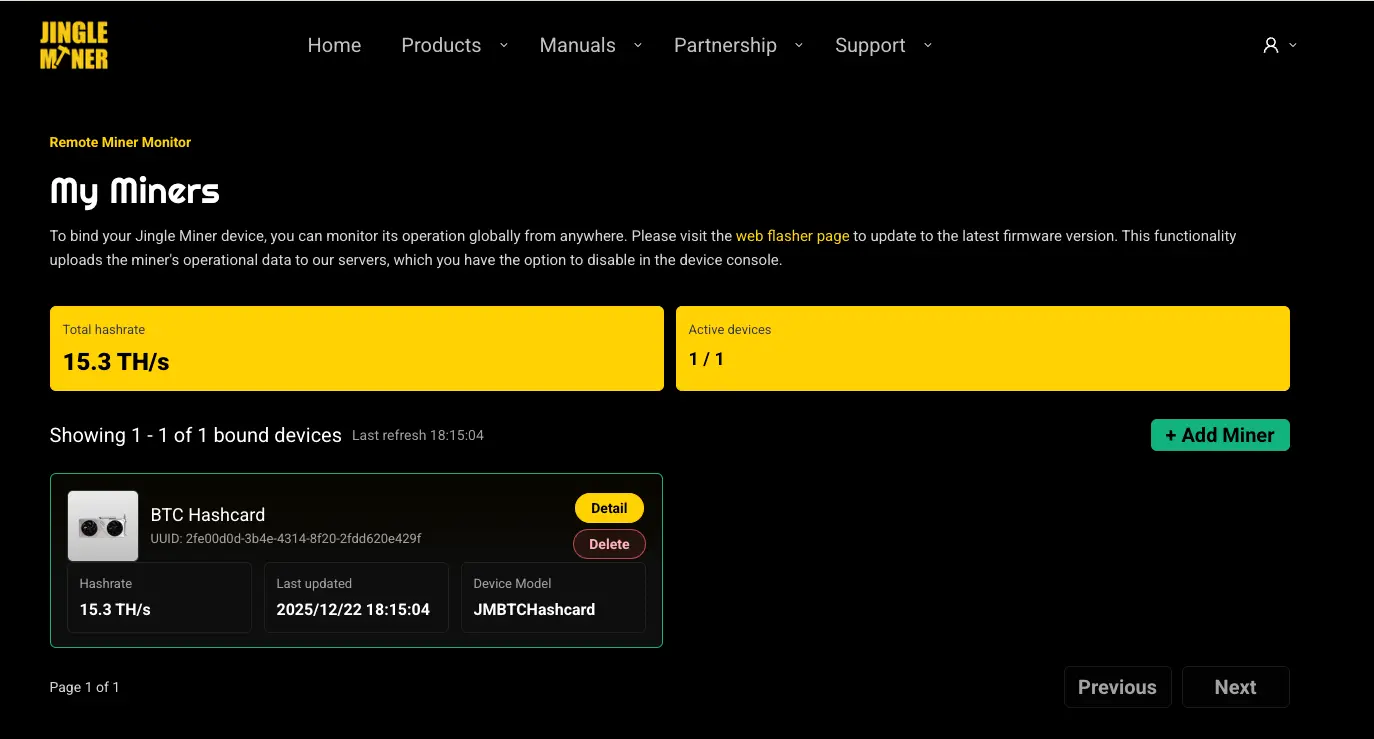
The JM Remote Monitor dashboard at jingleminer.com gives you visibility into hashrate, pool connection, fan speeds, and temperatures from anywhere in the world. It requires no extra hardware; you bind a device to the “My Miners” page in your Jingle Miner account. It supports unlimited device bindings, needs no local-network configuration, and is free to use with no subscription.
JClaw: An AI Agent for Home Mining
Jingle's "JClaw" GitHub-published skill integrates the JM Remote Monitor with AI assistants via an MCP-style interface. The repository (JingleMiner/Jingle-Miner-Device-Monitor-Skill) is publicly readable and lets an AI agent perform remote monitoring tasks like pulling live hashrate, active devices, pool connection status, network latency, fan speed, temperature, and even environmental context like weather forecasts.
In practice, this means a user can ask their AI agent something like, "Set up a daily 12:00 PM miner report for me," and the agent will pull metrics from the JM Remote Monitor API and surface them. For a home miner running rigs in a garage or shed without dedicated monitoring infrastructure, that's a real quality-of-life upgrade. For the enthusiast and aspiring professional, it's an opportunity to get a glimpse of what industrial mining looks like in practice, and to learn by doing.
*Bonus* Home Intelligent Mining: Riding the Ontario Off-Peak Market
Earlier in this blog, we mentioned that "flat residential rates" is where the energy story gets interesting. Here it is: industrial Bitcoin miners don’t pay the “average” electricity price. They purchase power in wholesale markets, participate in demand response programs, curtail during power price peaks, and run hardest during cheap-to-zero power price hours when renewables overproduce. Luxor's Commander automates this complex coordination for enterprise mining sites in ERCOT.
With the BTC Hashcard, home miners can now implement similar strategies at a smaller, simpler scale. We demonstrate the concept below.
Most North American utilities now offer some form of time-of-use (TOU) pricing, often with overnight rates that are a fraction of the daytime average. Ontario's Ultra-Low Overnight (ULO) plan is one example:
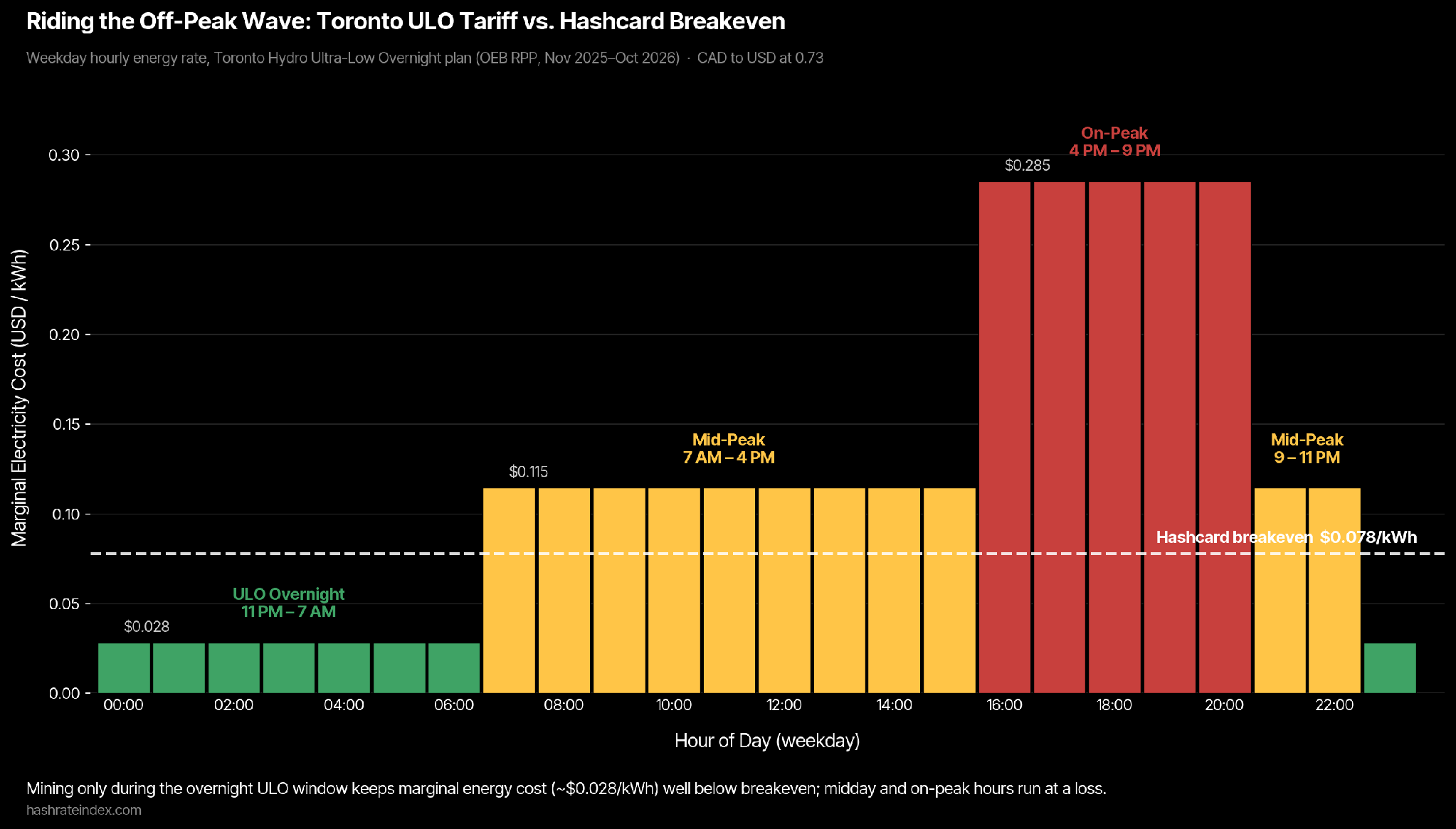
Under Ontario's Ultra-Low Overnight (ULO) plan, overnight energy rates are $0.039/kWh CAD (~$0.028/kWh USD) during the 11 PM–7 AM window every day. This power price range is well below the Hashcard's ~$0.07/kWh USD breakeven. Run the Hashcard only during that eight-hour window and you generate ~190 sats per day at an effective energy cost of about ~$0.045 per day, against daily revenue of about ~$0.125 in that same window. That's a revenue-to-energy ratio of roughly 2.8x while the device is operating.
The trade-off is in uptime. Outside ULO hours, the math reverses hard. Mid-peak at $0.157/kWh CAD (~$0.115/kWh USD) sits about 47% above breakeven; on-peak from 4 PM–9 PM weekdays hits $0.391/kWh CAD (~$0.285/kWh USD), roughly 3.7x the breakeven, burning about $0.207/kWh net during those hours. The Hashcard needs to stop running (i.e., curtail) during these uneconomic windows.
How could a home miner actually do this without manually flipping switches twice a day? Three options, in ascending order of sophistication:
- A basic smart plug on a fixed timer — set it once, never think about it again. The Hashcard reboots cleanly on power cycles, so this works.
- A Home Assistant automation that reads your local TOU schedule (most utilities publish API endpoints or scrapeable schedules) and toggles the plug accordingly. Useful if your utility has variable peak windows or seasonal pricing.
- JClaw plus a data source. The JM Remote Monitor API exposes the controls needed to schedule the Hashcard, and a JClaw skill that pulls real-time electricity pricing from an ISO with public dispatch data could in principle automate mining operations around variable-rate power prices.
The third option is the most interesting. Industrial miners have spent years figuring out how to make hashrate behave like a flexible load that responds to grid conditions. The combination of a desktop form factor miner with a clean monitoring API and AI-assistant integration is the first time a similar software stack has been credibly made available to home miners. The Hashcard is the first home mining product where Intelligent Mining is possible.
Market Positioning
The Hashcard fills a real gap in the home mining category, sitting in between lightweight home miners and intermediate-to-industrial machine models.
| Device | Hashrate | Power | Efficiency | Price |
|---|---|---|---|---|
| Avalon Nano 3 | 3.2 TH/s | 140W | 44 J/TH | ~$169.99 ($53.12/TH) |
| Avalon Nano 3S | 6 TH/s | 140W | 23.3 J/TH | ~$299.99 ($50.00/TH) |
| BTC Hashcard | 12.5 TH/s | 200W | 16 J/TH | ~$559.99 ($44.80/TH) |
| Avalon Mini 3 | 37.5 TH/s | 800W | 21.3 J/TH | ~$1,288 ($34.35/TH) |
| Avalon Q | 90 TH/s | 800W | 19 J/TH | ~$1,899 ($21.10/TH) |
At ~$44.80/TH, the Hashcard is priced more like a Nano but performs more like the Mini 3 or Q. What it definitely doesn't do: heat recycling. The Hashcard simply dissipates warm air out the back of a standard GPU shroud; it is not designed for heat production.
Who Is the Hashcard For?
- GPU-mining veterans who want a hardware aesthetic that nods to where they started.
- Home miners who've outgrown the Bitaxe / Nano tier and want a single device that hashes meaningfully without graduating to a Mini 3, Avalon Q or other industrial rigs.
- Mining enthusiasts who want to stack non-KYC BTC and/or solo mine with the best odds available in a desktop form factor.
- Small-scale miners who want to assemble a Hashcard cluster in a standard PC case or open-air frame.
Conclusion
The BTC Hashcard is a home miner taking Bitcoin back to its GPU roots, and it walks its talk with serious silicon under the hood. At 12.5 TH/s and 16 J/TH, it's genuinely competitive on efficiency, offers a unique performance profile in the home mining segment, and ships with interesting software support tools that give home miners a taste of what it’s like to manage professional bitcoin mining operations.
It won't pay your power bill, but it's a credible entry into the beautiful game.
— Happy Hashing!
About Luxor Technology Corporation
Luxor delivers hardware, software, and financial services that power the global compute and energy industry. Its product suite spans Bitcoin Mining Pools, ASIC Firmware, Hardware trading, Hashrate Derivatives, Energy services, a Miner Management software, Commander, and a bitcoin mining data platform, Hashrate Index.
Disclaimer
This content is for informational purposes only, you should not construe any such information or other material as legal, investment, financial, or other advice.

Hashrate Index Newsletter
Join the newsletter to receive the latest updates in your inbox.